Every custom box starts life as a flat drawing. Before a single sheet is printed, someone has to map out exactly where the board will be cut, where it will fold, where glue goes, and where the artwork must sit so the logo doesn’t end up upside down on the bottom flap. That map is the packaging dieline, and it is the single most important file in any custom box project.
This guide explains what a dieline contains, how to read its lines and colors, how to set up artwork correctly, and the small mistakes that lead to expensive reprints.
The Simple Definition of a Dieline
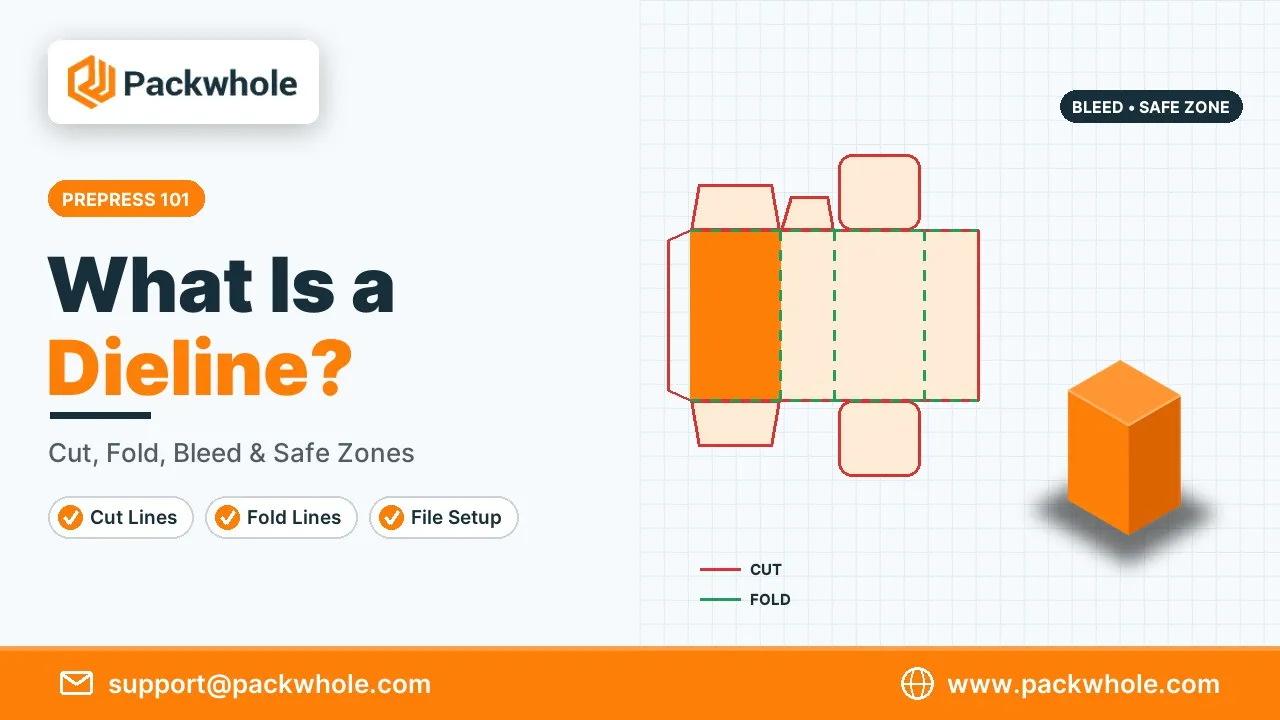
A dieline is a flat, to-scale template of a package, showing its outline and every fold, cut, and glue area. The name comes from the cutting die: a steel-rule tool shaped like the template that presses through printed sheets to cut and crease them in one stroke. Designers place their artwork on top of the dieline so that, once cut and folded, every panel lands in the right place. You can learn more about how dies work in our article on the die cutting process.
A dieline is usually supplied as a vector file (AI, PDF, or EPS) so lines stay perfectly sharp at any size.
The Lines and Zones on a Packaging Dieline
Dielines use a shared visual language. Different line styles and colors tell the printer and designer what happens at each spot. Conventions vary slightly between suppliers, so always read the legend on the file you receive. The table shows the most common elements.
| Element | Usual Appearance | What It Means |
|---|---|---|
| Cut line | Solid line (often red or black) | The die cuts all the way through here |
| Crease / fold line | Dashed line (often green or blue) | The board is scored so it folds cleanly |
| Perforation | Dotted or dash-dot line | Partial cuts for tear strips or easy opening |
| Glue area | Shaded or hatched zone | Adhesive is applied; keep heavy ink off |
| Bleed | Line outside the cut, usually 1/8 in | Artwork must extend to here |
| Safe zone | Line inside the cut, usually 1/8 in | Keep text and logos inside this |
| Window | Labeled cut-out area | Opening for a clear film or product view |
How a Box Takes Shape From a Flat Template
It helps to picture the dieline folding up. For a standard tuck-end carton, the long strip in the middle becomes the four side panels. Tabs at the top and bottom become tuck flaps and dust flaps, and a narrow glue flap on one edge attaches the last side panel to the first. Once you mentally fold it, you can see which way each panel faces and which way the artwork should be oriented.
Quick tip: print the dieline on plain paper at 100% scale, cut it out, and fold it by hand. Write “FRONT,” “TOP,” and “BACK” on the panels. This five-minute mockup catches upside-down text and misplaced logos before they reach the printer.
Setting Up Artwork on a Packaging Dieline
Good file setup prevents most printing problems. Keep the dieline on its own locked layer, named clearly, and set it as a spot color so the printer can turn it off when making plates. Place artwork on separate layers underneath. Before sending, check every panel against the bleed and safe zone.
Setup checklist:
- Work at actual size (1:1 scale) in the same units as the dieline.
- Keep the dieline on a separate, locked layer set to a spot color.
- Extend backgrounds to the bleed line, usually 1/8 inch beyond the cut.
- Keep text, logos, and barcodes at least 1/8 inch inside the cut line.
- Use CMYK color mode for print; see our CMYK explainer.
- Use high-resolution images at 300 dpi at final size.
- Convert fonts to outlines or include them with the file.
- Mark finish areas (foil, spot UV, emboss) on their own named layers.
Working With Your Supplier on Packaging Dieline Approval
Before production, most suppliers send a final proof that combines your artwork with the packaging dieline. This is your last chance to catch errors cheaply. Read it slowly, panel by panel, and print it at full size if you can. Approving a proof means you accept responsibility for anything shown on it, so take the time to check carefully.
Proof checklist:
- Logos face the right way when the box is folded.
- Barcodes are on a flat panel and scan correctly.
- No text crosses fold lines or sits inside glue areas.
- Foil, spot UV, and emboss areas are marked correctly.
- Colors and finishes match your brand specifications.
Common Box Styles and What Their Dielines Look Like
Each box style has its own recognizable template. Knowing the basic shapes helps you choose a structure and communicate with your supplier. Most packaging companies, including PackWhole, can supply ready-made dielines for standard styles sized to your product.
- Straight tuck end: both tuck flaps on the same side; popular for cosmetics.
- Reverse tuck end: tuck flaps on opposite sides; efficient and economical.
- Auto lock bottom: a bottom that snaps into place for heavier items.
- Mailer box (roll end tuck front): a one-piece box with a hinged lid; see our custom mailer boxes.
- Tray and sleeve: two dielines, one for the tray and one for the sleeve.
- Two-piece rigid box: separate dielines for the base, the lid, and the wrap paper.
- Pillow box: curved score lines that create the pillow shape.
Custom Dielines vs Standard Templates
You can start from a standard template or have a dieline engineered just for your product. Standard templates are faster and cheaper because the cutting die may already exist. Custom dielines take more time but allow unique shapes, inserts, windows, and opening experiences. Many brands begin with standard styles and move to custom structures once their product line is stable.
| Factor | Standard Template | Custom Dieline |
|---|---|---|
| Cost | Lower | Higher (new die and engineering) |
| Lead time | Faster | Slower |
| Uniqueness | Common shape | Unique to your brand |
| Best for | Launches, tests, simple products | Signature products, special shapes |
Mistakes That Ruin a Dieline File
Dieline errors are expensive because they are often found only after cutting. A few careful checks before submission prevent nearly all of them. These are the most frequent issues we fix during prepress.
- Resizing the dieline in a design program, which distorts measurements.
- Forgetting bleed, which leaves white slivers at the edges.
- Placing text across fold lines.
- Printing artwork upside down on the top or bottom panels.
- Leaving the dieline visible in the artwork layer so it prints on the box.
- Ignoring glue areas and printing heavy ink where adhesive must stick.
Our list of custom packaging terms explains more prepress vocabulary.
Get a Free Packaging Dieline From PackWhole
PackWhole creates accurate packaging dieline files for every box we produce, sized to your exact product. Send us your measurements and preferred style, and we will return a ready-to-design template with clear cut, crease, bleed, and safe zones. Our designers can also place your artwork for you at no extra charge, and you can begin with a short run of custom die cut boxes.
Request a template at support@packwhole.com, or choose a box style at www.packwhole.com.
Packaging Dieline FAQs
Here are quick answers to the questions designers and brand owners ask most about dielines. If you are working with a freelance designer, share these answers with them before they start, as it saves rounds of corrections.
Who creates the dieline?
Usually the packaging supplier, because the dieline must match their cutting dies and materials.
What file format should a dieline be?
A vector format such as AI, PDF, or EPS, at 1:1 scale.
What is bleed on a dieline?
Extra artwork beyond the cut line, usually 1/8 inch, so no white edges appear after cutting.
Can I design packaging without a dieline?
You can sketch ideas, but final artwork must be placed on the correct dieline for production.
Do I pay for a dieline?
Many suppliers, including PackWhole, provide standard dielines free with an order.