A logo that looks crisp on your phone can come back blurry on a printed box. The reason is almost always resolution. Getting the DPI for packaging printing right is one of the simplest ways to make sure photos, patterns and small text look as sharp on a shelf as they do on screen.
This guide explains what DPI means, the resolution printers expect, how to check your files, and when to use vector artwork instead.
What DPI Means and Why Screens Can Fool You
DPI stands for dots per inch. In printing, it describes how many dots of ink are placed in one inch of paper. In design files, people often use DPI and PPI (pixels per inch) to mean the same thing: how many image pixels will fit into one printed inch. The more pixels per inch, the finer the detail.
Screens are forgiving. A phone or monitor shows images at much lower density, so a small web image can look sharp on screen but turn soft or jagged when printed several inches wide. That is why an image pulled from a website is rarely good enough for packaging.
The Standard DPI for Packaging Printing
For most custom boxes, printers ask for photos and raster images at 300 DPI at the final printed size. This means if an image will print 4 inches wide on the box, it should be at least 1,200 pixels wide. Lower resolution may look acceptable from a distance, but small text and fine details will suffer.
| Artwork Type | Recommended Resolution | Notes |
|---|---|---|
| Product photos and backgrounds | 300 DPI at final size | Standard for offset and digital printing |
| Large-format displays viewed from a distance | 150 to 200 DPI | Viewing distance hides fine detail |
| Line art and black-only graphics (raster) | 600 to 1,200 DPI | Keeps edges crisp |
| Logos, text and icons | Vector (no DPI) | Scales to any size without loss |
| Barcodes | Vector preferred | Raster barcodes can fail scanning |
When in doubt, aim for 300 DPI and supply logos as vector files.
Calculating the Pixels You Need
Resolution only makes sense in relation to print size. A 3,000-pixel-wide image is plenty for a small mailer panel but may be too small for a large display header. A quick calculation tells you whether your image is big enough before you send it to the printer.
Use this formula:
- Measure the printed width and height of the image area in inches.
- Multiply each by 300.
- Compare the result with your image’s pixel dimensions.
For example, a 10 x 8 inch box lid needs an image of at least 3,000 x 2,400 pixels. If your file is smaller, you will need a higher-resolution photo, a redesign with less enlargement, or vector artwork.
How to Check DPI for Packaging Printing in Common Design Programs
Checking resolution takes less than a minute, and it can save a costly reprint. Most design programs show the effective resolution of an image once it is placed at final size. Look at the effective number, not just the file’s original setting.
Quick checks:
- Photo editing software: open the image size dialog, turn off resampling and set the print size to see the true resolution.
- Vector design software: the links or document info panel shows the effective PPI of placed images.
- Page layout software: the links panel lists both actual and effective PPI for every image.
- Browser-based design tools: export as a print-quality PDF at the highest setting and avoid enlarging small images.
If the effective resolution drops below about 250 at final size, replace or resize the image.
Why Upscaling a Low-Resolution Image Does Not Work
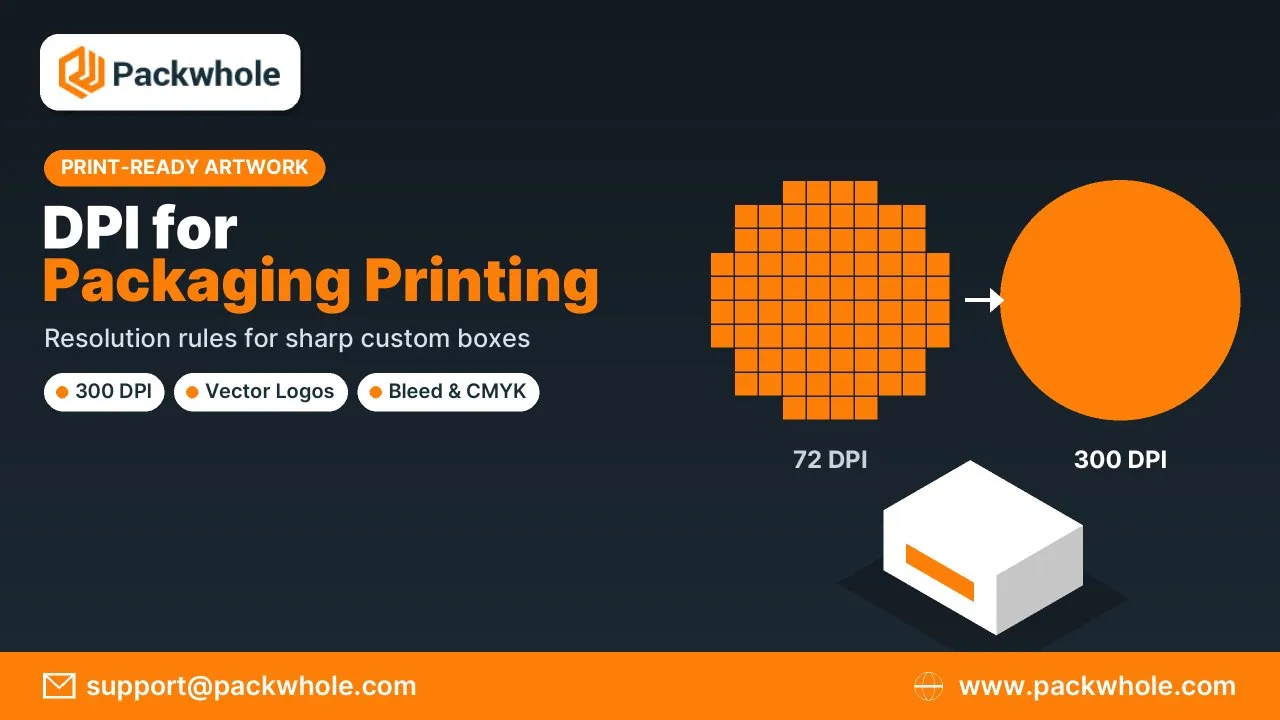
Changing a 72 DPI image to 300 DPI in software adds pixels, but it cannot add detail that was never captured. The result is usually soft or blocky. Some AI upscaling tools produce better results than simple resizing, but they can create odd textures, especially in text and logos.
Better solutions:
- Ask the photographer or supplier for the original high-resolution file.
- Re-photograph the product at higher resolution.
- Rebuild logos and graphics as vector artwork.
- Reduce the printed size of the image on the box.
- Use a pattern or solid color instead of an enlarged photo.
DPI for Packaging Printing on Different Box Types
The same resolution rules apply to every box, but some packaging types show problems more clearly than others. Folding cartons for cosmetics are viewed up close, so small text and product photos need full resolution. Corrugated boxes printed with flexography show less fine detail, so very small text and thin lines should be avoided even when the file is sharp. Large retail displays are seen from farther away, which allows slightly lower resolution on big images.
A quick guide by box type:
- Cosmetic and retail cartons: 300 DPI images and vector text; viewers hold them close.
- Printed mailer boxes: 300 DPI for full-color litho or digital print.
- Flexo-printed shipping boxes: simple vector logos and bold text work best.
- Floor and counter displays: 150 to 300 DPI depending on viewing distance.
Matching your DPI for packaging printing to the box type and print method keeps files manageable without sacrificing quality.
Vector Artwork: When DPI Does Not Apply
Logos, text, icons and many illustrations should be created as vector artwork. Vector files are made of mathematical paths instead of pixels, so they stay perfectly sharp at any size, from a lip balm box to a floor display. File types include AI, EPS, SVG and vector PDF.
Best practices for vector files:
- Convert fonts to outlines or include font files with your artwork.
- Keep thin lines at least 0.25 pt so they print reliably.
- Avoid embedding low-resolution screenshots inside vector files.
- Use vector barcodes generated by barcode software.
Combining a 300 DPI photo with vector text is the standard approach for high-quality packaging.
Resolution, Color and Print Method Work Together
Good resolution is only one part of print-ready artwork. Color mode and printing method also affect how sharp and accurate the final box looks. Offset printing uses a screen measured in lines per inch (LPI), commonly 150 to 175 LPI for packaging, and 300 DPI images comfortably support that range. Digital presses work slightly differently but follow the same 300 DPI guideline.
Other print-ready checks:
- Convert files to CMYK unless you are using Pantone spot colors.
- Add 1/8 inch bleed beyond cut lines.
- Keep important text 1/8 inch inside the safe zone.
- Use rich black carefully on large areas and plain black for small text.
Learn more in our guides to CMYK for printing and offset vs digital printing.
DPI for Packaging Printing Mistakes to Avoid
Resolution problems are among the most common reasons for delayed proofs. Most come from using images saved for the web or from enlarging artwork late in the design process. Avoid these errors.
- Downloading product images from a website or social media.
- Placing a small logo and stretching it to fill a panel.
- Checking resolution before scaling the image to final size.
- Sending JPGs of text-heavy designs instead of vector PDFs.
- Ignoring printer warnings about low-resolution images.
Get Print-Ready Artwork Support From PackWhole
PackWhole checks every file before printing and flags images that fall below the right DPI for packaging printing. Our designers can rebuild logos as vector art, place your artwork on the dieline and send a free digital proof. We print custom product boxes, mailer boxes and display boxes with low minimum orders.
Send your artwork files to support@packwhole.com for a free resolution check, or start your box design at www.packwhole.com.
FAQs on DPI for Packaging Printing
These short answers cover the resolution questions designers and brand owners ask most often. If you are unsure about a file, send it to your printer for a quick check before final approval.
Is 72 DPI good enough for printing boxes?
No. 72 DPI is a screen resolution; packaging usually needs 300 DPI at final size.
Do logos need to be 300 DPI?
Logos should ideally be vector files, which do not depend on DPI.
Is higher than 300 DPI better?
Not for photos. Files above 300 DPI rarely look sharper and are larger to process.
Can I send a PNG for printing?
Yes, if it has enough resolution, but PDF files with vector text are preferred.
What DPI do large displays need?
Large displays seen from a distance can use 150 to 200 DPI at final size.