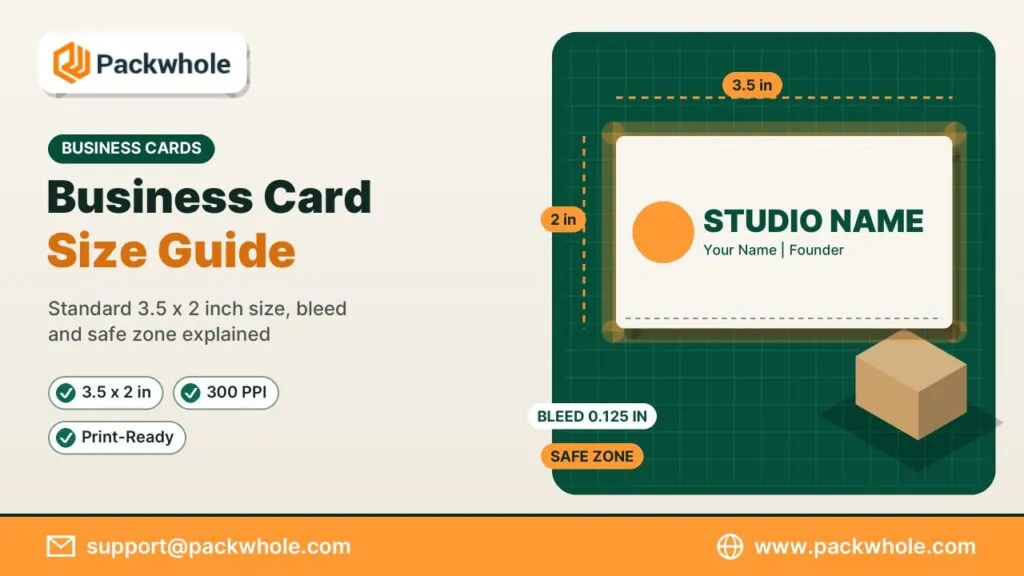
Getting the business card size right is the first step to a card that looks sharp, fits every wallet and prints without white slivers around the edges. In the United States the answer seems simple, yet many files still arrive at the printer with the wrong dimensions, no bleed or text sitting dangerously close to the trim. This guide walks through the standard measurements, the setup a printer expects and the alternative shapes worth considering, so your next order goes from file to finished card without a reprint.
The Standard US Business Card Size and Why It Became the Default
The standard business card size in the US is 3.5 x 2 inches (88.9 x 50.8 mm). It matches the slots in wallets, card holders and desk organizers, which is why most people never question it. Printers also lay out press sheets around this format, so it is usually the most economical choice. If you want your card to slide neatly into the places people already keep cards, this is the size to start with.
Here is how the common business card size formats compare:
| Format | Inches | Millimeters | Best for |
|---|---|---|---|
| Standard US | 3.5 x 2 | 88.9 x 50.8 | Most businesses and professionals |
| Square | 2.5 x 2.5 | 63.5 x 63.5 | Creative studios and bold logos |
| Mini or slim | 3.5 x 1.5 | 88.9 x 38.1 | Referral cards, tags and social handles |
| European | 3.35 x 2.17 | 85 x 55 | Clients and partners in Europe |
| Credit card | 3.37 x 2.13 | 85.6 x 54 | Loyalty and membership cards |
Bleed, Trim and Safe Zone: The Three Lines Every File Needs
A printer does not cut each card individually with perfect accuracy. Cards are printed on large sheets and trimmed in stacks, so the blade can drift slightly. That is why a print-ready file uses three invisible guides. Understanding them takes a few minutes and saves you from cards with uneven borders or cut-off phone numbers.
- Trim line: the final edge of the card, 3.5 x 2 inches for a standard card.
- Bleed: an extra 0.125 inch on every side, so the full artboard becomes 3.75 x 2.25 inches. Backgrounds and images that touch the edge must extend into this area.
- Safe zone: keep text and logos at least 0.125 inch inside the trim line, which leaves a safe area of about 3.25 x 1.75 inches.
If your design has a solid color or photo that runs to the edge, the bleed is not optional. Without it, a tiny shift during cutting leaves a thin white line that looks like a mistake.
Business Card Size in Pixels for Design Software and Online Tools
Many people design cards in tools that think in pixels instead of inches. The math depends on resolution, and print needs far more detail than a screen. A file that looks crisp on a monitor can print soft and blurry if it was built at 72 pixels per inch. Use the numbers below as your canvas size and you will have enough resolution for clean type and logos.
| Setup | At 300 PPI | At 600 PPI |
|---|---|---|
| Trim size 3.5 x 2 in | 1050 x 600 px | 2100 x 1200 px |
| With bleed 3.75 x 2.25 in | 1125 x 675 px | 2250 x 1350 px |
Whenever possible, keep the logo and text as vectors in a PDF. Vector artwork stays sharp at any size, while raster images are locked to the pixels you started with.
Choosing Between Standard, Square and Mini Card Formats
The right card size depends on what the card has to do and how you want people to remember you. A standard card is the safest bet for networking, sales and client meetings. Square and mini cards trade a little practicality for personality, which can be exactly what a creative brand needs. Think about where the card will live after you hand it over.
When a Standard Card Makes the Most Sense
Consultants, contractors, real estate agents and healthcare offices usually stick with the classic format. It holds a full set of contact details without crowding and fits into any card holder on a reception desk. You can browse paper and finish options on our standard business cards page.
When a Square Card Helps You Stand Out
A square card feels different the moment someone takes it, which makes it popular with designers, photographers and boutique brands. The even sides suit a centered logo or a QR code. See layouts on our square business cards page.
When a Mini Card Is the Smarter Pick
Slim cards work as referral cards, hang tags, appointment reminders or a quick way to share a social handle. They are not ideal for long addresses, so keep the content short. Our mini business cards are a good fit for this kind of card.
How Paper Thickness Changes the Way Your Card Size Feels
Two cards with the same dimensions can feel completely different in the hand. Thickness, coating and texture all change how solid and premium a card seems. A thin card bends in a pocket, while a heavy stock feels confident and lasts longer. The paper does not change the trim size, but it does change the impression.
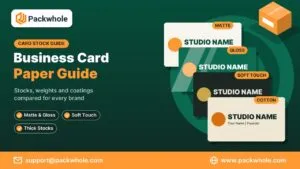
Popular options include smooth matte for everyday use, gloss for photo-heavy designs and soft touch for a velvety premium feel. If you want maximum weight, look at thick business cards, which give a standard-sized card noticeably more presence on the table.
Step-by-Step: Setting Up a Print-Ready Business Card File
A clean file is the fastest route to a perfect print. Most delays happen because a file is missing bleed, uses RGB colors or has fonts that did not travel with the document. Follow these steps in Adobe Illustrator, InDesign, Affinity or Canva and your card will move straight to proofing.
- Create a document at 3.75 x 2.25 inches, which includes 0.125 inch of bleed on each side.
- Add guides at 0.125 inch for the trim line and 0.25 inch from the outer edge for the safe zone.
- Set the color mode to CMYK, since presses print with cyan, magenta, yellow and black inks.
- Extend any background color or image to the outer edge of the bleed.
- Keep important text at 7 points or larger for readability.
- Convert fonts to outlines or embed them in the PDF.
- Export a high-resolution PDF with crop marks and bleed included.
If color mode is new to you, our guide on CMYK for printing explains why screen colors and printed colors can differ.
Common Business Card Size Mistakes That Lead to Reprints
Most printing problems come from small setup errors that are easy to avoid once you know them. A quick check before you upload saves time, money and the frustration of waiting for a second batch. These are the issues printers see most often, along with the fix for each one.
- No bleed: artwork stops at 3.5 x 2 inches, so the trim leaves white edges. Fix it by extending the background into the bleed.
- Text too close to the edge: a phone number sitting on the trim line can be shaved off. Keep it inside the safe zone.
- Thin borders: a frame close to the edge exaggerates any small cutting shift. Use a wider border or remove it.
- Low-resolution logos: an image pulled from a website prints fuzzy. Use the original vector file.
- Wrong orientation: decide early whether the card is horizontal or vertical so both sides line up.
Double-Sided Designs, Folded Cards and Other Business Card Size Questions
Once the basic business card size is settled, a few related choices still affect the file you send. Printing on both sides gives you more room without changing the dimensions, while folded cards double the space but need a different layout. Rounded corners and custom shapes also change how the safe zone works. Plan these details before you start designing so the front and back line up perfectly.
- Double-sided cards: create two pages at the same business card size, one for the front and one for the back, and keep the orientation consistent.
- Folded cards: a standard folded card is 3.5 x 4 inches flat and folds down to 3.5 x 2 inches, so the fold line needs its own safe margin.
- Rounded corners: a corner radius of about 0.125 to 0.25 inch trims away the corners, so keep logos and text well clear of them.
- Custom shapes: die-cut cards follow a special outline, so ask for a dieline before you design.
A short note on orientation: vertical cards use exactly the same business card size, just rotated to 2 x 3.5 inches. They suit portfolios, personal brands and minimal designs with a single strong logo.
Get Your Business Cards Printed in the Right Size From Day One
Once your file is set up correctly, choosing the paper and finish becomes the fun part. Our team checks your dimensions, bleed and safe zone before anything goes to press, and you approve a digital proof first. You also get free design help and low minimum orders, so even a small first run is easy to start.
Send your questions to support@packwhole.com or browse every format at www.packwhole.com, and our print team will help you pick the card size that suits your brand best.